
Hitachi Air Conditioner Symbols Explained: Remote Icons and What They Mean

What Do the Symbols on a Hitachi Air Conditioner Remote Mean?
Hitachi air conditioner symbols can be confusing, especially when you pick up a remote for the first time and face a row of tiny icons with no obvious labels. This guide decodes every major symbol you will find on a Hitachi remote control, covering operating modes, fan speed settings, timer functions and warning indicators. By the end, you will know exactly what each icon does and how to get the most out of your unit.
We will work through the symbols in a logical order, starting with the operating modes you will use every day, then moving on to fan and airflow controls, temperature and timer settings, and finally the warning lights that appear on the unit itself. Whether your remote is from the RAS or XJA series, the core symbols are consistent across Hitachi's range.
Key takeaways
- Hitachi air conditioner symbols control operating modes, fan speed and timer functions across all models
- Cool, Heat and Auto modes cover most everyday use in Australian homes
- Warning lights like the filter reminder are routine maintenance alerts, not faults
Hitachi Air Conditioner Symbols: Operating Modes Explained
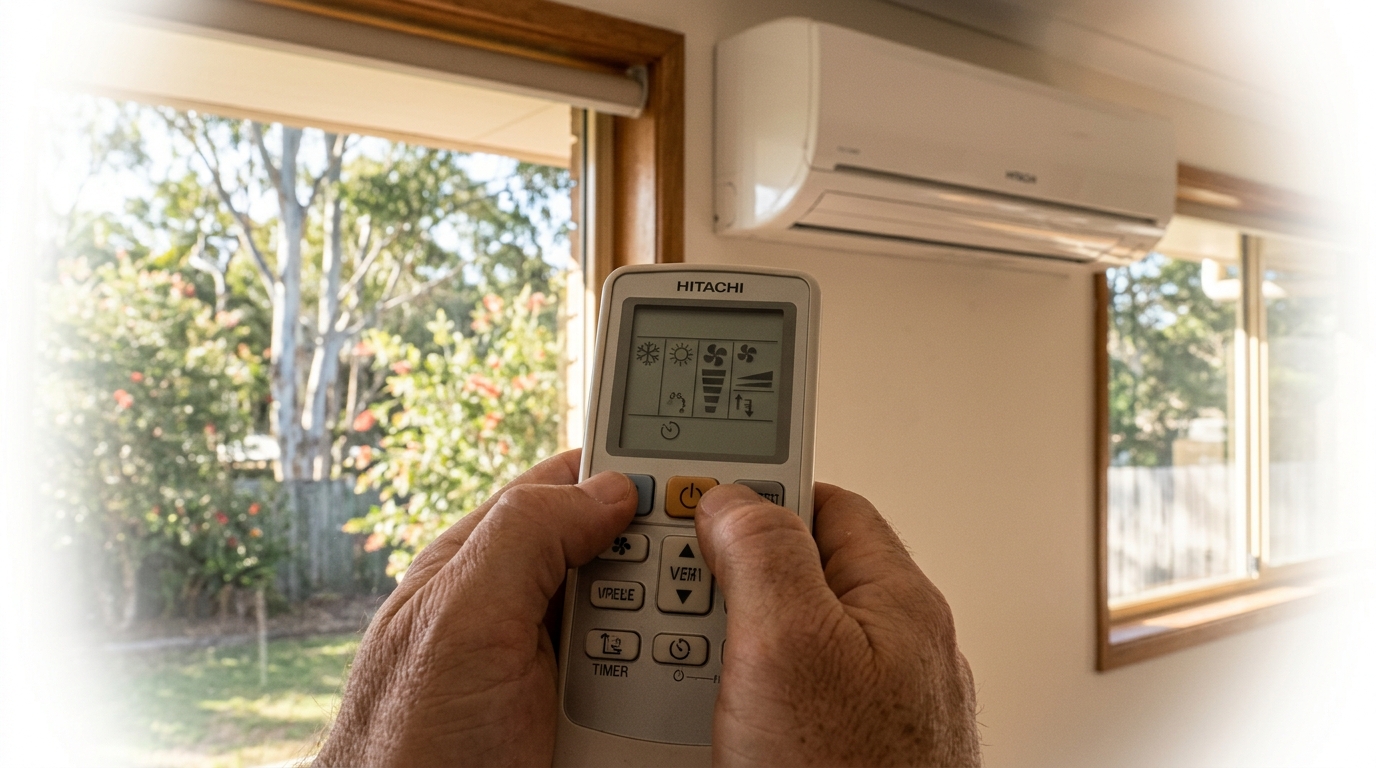
The operating mode symbols on a Hitachi remote control tell the unit how to treat the air in your room. There are five core modes found across Hitachi's RAS and XJA series remotes: Cool, Heat, Dry, Fan Only and Auto. Each is represented by a distinct icon, and selecting the wrong one is one of the most common reasons a unit seems to "not work properly." Browse our range of Hitachi split systems for full model specs and remote compatibility details.
Cool, Heat and Auto: The Three Modes You'll Use Most
These three modes cover the vast majority of everyday use. Here is what each symbol means and when to use it.
- Cool (snowflake icon): The snowflake symbol activates the refrigeration cycle, drawing heat out of the room and expelling it outside. This is your standard cooling mode for hot Australian summers. Set your target temperature and the unit will run the compressor until the room reaches it.
- Heat (sun icon): The sun symbol reverses the refrigeration cycle, extracting heat from the outside air and transferring it indoors. This is how a reverse-cycle split system heats a room efficiently, even on cold mornings. It is far more energy-efficient than a resistive heater.
- Auto (circular arrows or 'A' icon): In Auto mode, the unit compares the room temperature to your set temperature and decides whether to cool or heat automatically. If the room is warmer than the set point, it cools. If it is cooler, it heats. This mode is particularly useful in Australian climates where a single day can swing from a cool morning to a hot afternoon. You set the temperature once and the unit handles the rest.
For most Australian households, Auto mode is the most practical choice for year-round comfort. It removes the need to manually switch between Cool and Heat as the seasons change.
Dry Mode and Fan-Only Mode
These two modes are often overlooked but are genuinely useful in the right conditions.
- Dry (water droplet icon): The water droplet symbol activates Dry mode, which runs the unit at a low, steady output to reduce humidity in the room without aggressively dropping the temperature. This is ideal for humid summer days in coastal or tropical parts of Australia, where the air feels sticky even when it is not extremely hot. Dry mode does not replace a dedicated dehumidifier for serious moisture problems, but it takes the edge off mild, muggy conditions without overcooling the room.
- Fan Only (fan blades icon): The fan blades symbol runs the indoor unit's fan without activating the compressor. No heating or cooling takes place. This mode simply circulates the air in the room, which can improve comfort on mild days or help distribute air from another heat source. It also uses very little electricity compared to any of the active modes.
A common mistake is leaving the unit in Dry mode on a cold day, which can make the room feel uncomfortably chilly. Use Dry mode when the temperature is already comfortable but the air feels heavy and humid.
Fan Speed, Airflow Direction and Special Function Symbols
Beyond the operating mode icons, Hitachi remotes carry a second row of symbols that control how air is delivered into the room. These include fan speed, louvre direction, sleep mode, timer scheduling and the Powerful mode that blasts the unit to full capacity. Understanding these symbols lets you fine-tune comfort rather than just switching the unit on and hoping for the best.
Fan Speed and Swing Symbols
Fan speed on a Hitachi remote is typically shown as one, two or three horizontal lines or bars stacked on top of each other. One bar means Low, two bars means Medium and three bars means High. Most remotes also include an 'Auto' fan setting, sometimes shown as the letter 'A' alongside the bars, which lets the unit choose the fan speed based on how far the room temperature is from your set point.
The swing symbol usually appears as an arrow looping around or pointing toward a horizontal line, representing the indoor unit's louvres. Pressing this button tells the louvres to oscillate up and down automatically, spreading conditioned air across the room rather than directing it at one fixed angle. Some Hitachi models, particularly those in the higher-capacity RAS series, also include a separate left-right swing symbol for horizontal airflow control, giving you full three-dimensional coverage of the room.
These features are common across most modern split system air conditioners, not just Hitachi, so the icons will look familiar if you have used other brands before.
Sleep Mode, Timer and Powerful Mode
The sleep symbol is a crescent moon or a 'ZZZ' icon. In cooling mode, activating Sleep mode causes the unit to gradually raise the set temperature by 1 degree Celsius per hour over a few hours, reducing energy use and preventing the room from becoming too cold overnight. The fan also drops to its quietest speed, so the unit runs almost silently while you sleep.
The timer symbol is a clock face or a small clock icon. It allows you to programme the unit to switch on or off at a specific time, which is useful for pre-cooling a room before you arrive home or shutting the unit off automatically after you fall asleep. Most Hitachi remotes support both an 'on' timer and an 'off' timer independently.
The Powerful mode symbol is a lightning bolt or the letter 'P'. Pressing it runs the compressor at maximum capacity for approximately 20 minutes, pushing the room temperature toward your set point as quickly as possible. It is handy when you walk into a hot room and want rapid relief, but it does increase energy consumption temporarily. Once the 20-minute burst is complete, the unit returns to its normal operating settings automatically.
Hitachi Warning Lights and Error Symbols: What They're Telling You
Warning lights on a Hitachi air conditioner are not always cause for alarm. Most indicators on the indoor unit's display panel are informational, telling you about routine events like a defrost cycle or a filter clean reminder. Knowing the difference between a normal status light and a genuine fault code saves you an unnecessary service call.
Here is what each common warning indicator means:
- Operation LED (green, flashing): A steady green Operation light means the unit is running normally. If this light flashes repeatedly, the unit has detected a fault and is displaying an error code. Count the number of flashes in the sequence, as this pattern corresponds to a specific fault code listed in your Hitachi owner's manual.
- Timer LED (amber, flashing): A flashing amber Timer light typically indicates a timer-related fault or, on some models, forms part of a combined error code sequence alongside the Operation LED. If the Timer light flashes when you have not set a timer, check the error code table in your manual or contact a technician.
- Defrost indicator: This light appears during the defrost cycle, which occurs automatically in heating mode when ice builds up on the outdoor unit's coil. The unit temporarily pauses heating output while it melts the ice. This is completely normal behaviour, particularly on cold mornings below around 5 degrees Celsius, and the light will go out once the cycle is complete.
- Filter symbol (grid or mesh icon): A grid or mesh icon on the remote screen or indoor unit display is a reminder to clean the air filter. Hitachi units typically trigger this reminder after 100 to 250 hours of operation, depending on the model. It is not a fault. Clean the filter, then reset the reminder by holding the relevant button on the remote as described in your manual.
Most of these indicators are routine and easy to resolve yourself. If an error code persists after you have checked the filter, confirmed the defrost cycle has finished and restarted the unit, it is worth calling a qualified technician rather than continuing to run the system. For persistent error codes on your unit, browse our Hitachi air conditioners page or contact our team for advice on the right next step.
Ready for an Upgrade? Explore Our Range of Split Systems
Understanding your Hitachi remote symbols helps you get more from your unit every day, extend its service life and sort out minor issues without calling a technician. Knowing what the filter reminder, defrost light and error flash sequences mean puts you in control rather than guessing. If your unit is ageing or keeps throwing persistent error codes, though, it may be time to consider a replacement rather than chasing ongoing repairs.
If you are considering a new unit, our Daikin split systems are a popular choice for Australian homes. The Daikin 2.5kW Inverter Split System LITE FTXF25WVMA is a solid entry-level option from $989, the 5kW FTXF50WVMA suits mid-sized rooms from $1,589 and the 7.1kW FTXF71WVMA handles open-plan living areas from $1,977. Not sure which capacity suits your space? Use our AC size calculator to find the right fit before you buy.
Frequently Asked Questions
What does the snowflake symbol mean on a Hitachi air conditioner remote?
The snowflake symbol on a Hitachi remote activates Cool mode, which runs the refrigeration cycle to remove heat from the room and expel it outside. This is the standard setting for hot days. Set your desired temperature and the unit will run the compressor until the room reaches that point, then cycle down to maintain it.
What does the water droplet symbol mean on a Hitachi remote?
The water droplet symbol represents Dry mode, which reduces indoor humidity without aggressively cooling the room. The unit runs at a low, steady output to pull moisture from the air, making it useful on humid days in coastal or tropical parts of Australia where the air feels sticky but the temperature is already comfortable. It is not a substitute for a dedicated dehumidifier in seriously damp spaces.
Why is the filter light on on my Hitachi air conditioner?
The filter light on a Hitachi air conditioner is a routine maintenance reminder, not a fault. Hitachi units typically trigger this indicator after 100 to 250 hours of operation to prompt you to clean the air filter. Remove and rinse the filter, let it dry fully, refit it and then reset the reminder by holding the designated button on your remote as described in your owner's manual.
What does a flashing green light mean on a Hitachi air conditioner?
A flashing green Operation light on a Hitachi indoor unit indicates the system has detected a fault and is displaying an error code through a flash sequence. Count the number of flashes in the repeating pattern and cross-reference that number against the fault code table in your Hitachi owner's manual. If the code persists after restarting the unit and checking the filter, contact a qualified air conditioning technician for a diagnosis.
Need expert advice?
Our team can help you choose the right air conditioning system for your space.