
Mitsubishi Air Conditioner Symbols Explained: Your Complete Remote Control Guide
Making Sense of Mitsubishi Air Conditioner Symbols
Pick up a Mitsubishi remote for the first time and it can feel like you're holding a device from another planet. Between the snowflakes, suns, arrows and cryptic letter combinations, the buttons rarely explain themselves. Understanding Mitsubishi air conditioners symbols is actually straightforward once you know what each icon group represents. This guide breaks them down into four clear categories: mode icons, temperature and fan controls, airflow direction symbols and advanced or special function symbols. By the time you've finished reading, you'll know exactly what every button does and be able to set up your unit with confidence.
Key takeaways
- Mitsubishi air conditioners symbols control modes, temperature, fan speed and airflow direction across split-systems.
- Cool mode uses a snowflake icon; set temperature between 24°C and 26°C for efficiency.
- Sleep and ECO modes reduce running costs without sacrificing comfort.
- Regular filter maintenance keeps your unit running smoothly and efficiently.
Mode Symbols on a Mitsubishi Air Conditioner Remote
The mode symbols are the most fundamental icons on any Mitsubishi remote. They control what the unit is actually doing, whether that's cooling, heating, drying the air or simply circulating it. There are five core mode symbols, and they appear consistently across the current range of Mitsubishi Electric split systems available in Australia. Getting these right is the single biggest step toward using your air conditioner properly.
Cool Mode (Snowflake Symbol)
The snowflake icon is the most-used symbol on Australian Mitsubishi remotes, and for good reason. Cool mode runs the refrigeration cycle to actively lower the room temperature, making it the go-to setting for the bulk of the Australian summer. For the best balance of comfort and energy efficiency, set your target temperature between 24°C and 26°C. Every degree lower than that adds roughly 5 to 10 percent to your running costs, so resist the urge to blast it at 18°C when 25°C will do the job comfortably within 20 minutes.
Heat, Dry, Fan and Auto Mode Symbols
The remaining four mode icons each serve a distinct purpose. Here's what each one looks like and when to reach for it.
- Heat mode (sun icon): The sun symbol activates the reverse-cycle heating function. The unit extracts heat from the outdoor air and transfers it inside, even on cold days. Use this in winter instead of a portable heater as it delivers three to five times more energy per dollar spent.
- Dry mode (water droplet icon): The droplet symbol runs the unit in dehumidification mode, removing moisture from the air without aggressively dropping the temperature. Use Dry mode on humid summer days to reduce that sticky, heavy feeling without overcooling the room.
- Fan Only mode (fan or windmill icon): This symbol looks like a spinning fan or a simple windmill shape. Fan Only circulates air without any heating or cooling. It's useful for mild days when you just want fresh airflow, and it uses very little electricity compared to the other modes.
- Auto mode (double arrow or 'A' icon): The Auto symbol is typically two arrows forming a loop, or simply the letter 'A'. In this mode, the unit reads the room temperature and decides whether to heat or cool to reach your set point. It's a convenient hands-off option, though some users prefer to set the mode manually so the unit doesn't switch unexpectedly between heating and cooling during mild weather.
Temperature, Fan Speed and Airflow Symbols
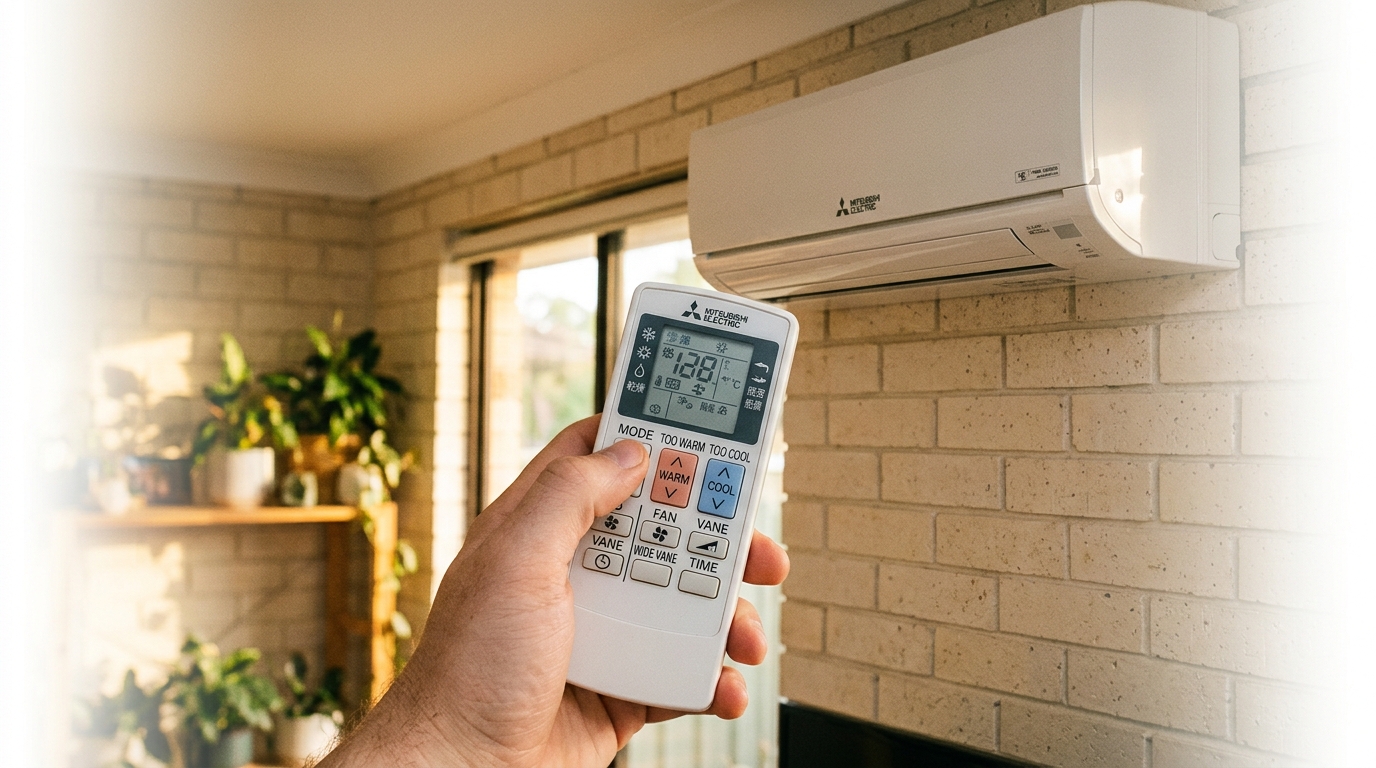
Getting airflow direction right can make a room feel several degrees cooler without changing the set temperature. The temperature, fan speed and swing symbols on your Mitsubishi remote control how hard the unit works and where it sends that conditioned air. Once you understand these controls, you can fine-tune comfort in a way that the basic mode buttons simply cannot achieve on their own.
The temperature arrows are the simplest symbols on the remote: an upward-pointing arrow raises the set temperature and a downward-pointing arrow lowers it. Each press typically moves the target temperature by 0.5°C or 1°C depending on the model. The current set temperature is always shown on the remote's display, so there's no guesswork involved.
Fan Speed Icons
Fan speed symbols control how quickly the unit moves air through the room. On most Mitsubishi Electric remotes, fan speed is shown as a series of stacked horizontal bars that increase in height from left to right, similar to a signal-strength icon on a phone. More bars means more airflow. Most models offer three or four manual speed settings, typically labelled Low, Medium, High and sometimes Very High, plus an Auto fan option.
For everyday comfort, Auto fan is the right choice. The unit reads the gap between the room temperature and your set point, then adjusts fan speed accordingly. It runs quietly at low speed once the room is comfortable and ramps up when it needs to catch up. Use High fan speed when you first turn the unit on and need to cool or heat the room quickly, then let Auto take over once you're close to your target temperature.
Airflow Direction: Swing and Vane Symbols
The swing symbols control where the conditioned air actually goes once it leaves the unit. Vertical swing is shown as a curved arrow looping over a horizontal line that represents the louvre. When this is active, the louvre moves up and down automatically to distribute air across the room. You can also press the button mid-swing to lock the louvre at a fixed angle if you prefer airflow directed at a specific spot.
Horizontal swing, where available, uses a similar icon but with left-right arrows instead. This sweeps air side to side across the room and is particularly useful in wider spaces where a single fixed direction would leave corners uncovered.
For cooling mode, aim the louvre upward so cool air falls naturally from ceiling height down through the room. For heating mode, angle the louvre downward so warm air reaches the floor level where occupants actually are, rather than pooling at the ceiling. This single adjustment can noticeably improve how quickly a room reaches a comfortable temperature.
The 'Powerful' or 'Turbo' symbol, often shown as a lightning bolt or the letter 'P', temporarily overrides the fan speed and compressor settings to push the unit to maximum output for around 20 minutes. It's useful for rapid cool-down on a hot afternoon but is not designed for continuous use.
Advanced and Special Function Symbols on Mitsubishi Remotes
The advanced function symbols on a Mitsubishi remote are the ones that most people ignore, yet they include some of the most useful features the unit offers. These icons cover sleep scheduling, energy management, filter maintenance reminders and app connectivity. Understanding them takes only a few minutes and can meaningfully reduce your running costs and day-to-day effort.
Sleep Mode and Economy Symbols
The Sleep mode symbol is a crescent moon icon, and it's one of the most practical features for Australian summers. Activating Sleep mode tells the unit to gradually ease the set temperature over the course of the night, typically raising it by around 0.5°C per hour up to a maximum of about 2°C above your original setting. The logic is straightforward: your body temperature drops as you sleep, so you need less aggressive cooling to stay comfortable. The fan speed also drops to its quietest setting, reducing noise in the bedroom. The combined effect is a noticeable reduction in overnight running costs without sacrificing sleep quality.
The Economy or ECO symbol is usually shown as a leaf icon or the letters 'ECO'. This mode caps the compressor's maximum output to reduce peak electricity draw. The unit still heats or cools toward your set temperature, but it does so more gradually. ECO mode is a good everyday setting if you're not in a hurry and want to keep your power bill in check. It's worth noting that ECO mode will take longer to reach your set temperature than standard operation, so it's less suited to rapid cool-down situations.
Timer, Filter Reset and Wi-Fi Symbols
The timer symbol looks like a small clock face and controls the unit's scheduling functions. Most Mitsubishi Electric remotes allow you to set both an 'On' timer and an 'Off' timer independently. A common use is setting the unit to switch on 30 minutes before you arrive home, so the room is already comfortable when you walk in. You can also set it to turn off automatically overnight if you prefer not to run it all night.
The filter reset indicator is not a fault code. It's a maintenance reminder that appears after a set number of operating hours, typically around 250 hours of use. When you see this light or symbol, it simply means the filter is due for a clean. Remove the filter, rinse it under warm water, let it dry fully and slide it back in. Once done, hold the filter reset button for a few seconds to clear the indicator. Ignoring it won't damage the unit, but a clogged filter reduces airflow and forces the unit to work harder.
The Wi-Fi symbol, a standard wireless fan icon, appears on Mitsubishi Electric models with built-in network connectivity. These units can be controlled remotely via the MELCloud app on your smartphone, letting you adjust temperature, mode and scheduling from anywhere. You can browse our range of Mitsubishi Electric Wi-Fi units to find a model with built-in app control. The i-Save button, where present, lets you store a preferred temperature setting and recall it instantly with a single press, which is handy if you always return to the same comfort setting.
Frequently Asked Questions
What do the symbols mean on my air conditioner?
Air conditioner symbols represent the unit's operating modes, temperature controls, fan speed, airflow direction and special functions such as sleep scheduling and economy settings. The most common symbols are the snowflake (cool), sun (heat), water droplet (dry), fan or windmill (fan only) and a double arrow or letter 'A' (auto). These symbols are largely consistent across all major brands, including Mitsubishi Electric, so the knowledge transfers well if you ever switch units.
What are the different modes on my Mitsubishi air conditioner?
Mitsubishi Electric air conditioners typically offer five operating modes: Cool, Heat, Dry, Fan and Auto. Cool lowers the room temperature, Heat warms it using the reverse-cycle function, Dry removes humidity without aggressive cooling, Fan circulates air without any temperature change, and Auto lets the unit decide whether to heat or cool based on your set point. Not all models include every mode, so check your user manual to confirm which modes your specific unit supports.
Which symbol is cool on a Mitsubishi air conditioner?
The Cool mode symbol on a Mitsubishi Electric remote is a snowflake icon. Pressing it switches the unit into active cooling mode, and you can then use the up and down arrow buttons to set your desired temperature. For the best balance of comfort and energy efficiency, a target temperature of 24°C to 26°C is recommended. Dropping below that range adds roughly 5 to 10 percent to your running costs for each degree.
How to use Mitsubishi AC remote control?
Using a Mitsubishi Electric remote is straightforward once you know the key buttons. Follow these steps to get started:
- Press the power button (a circle with a vertical line through the top) to turn the unit on.
- Press the Mode button to cycle through the available operating modes: Cool, Heat, Dry, Fan or Auto. Stop when you reach the mode you want.
- Use the up and down temperature arrow buttons to set your target temperature.
- Press the Fan Speed button to adjust airflow strength, or leave it on Auto to let the unit manage this itself.
- Press the Swing button to set the louvre direction and distribute air around the room.
- Use the Timer On and Timer Off buttons to schedule the unit to start or stop at a set time, so the room is ready when you need it.
Thinking About Upgrading Your Mitsubishi Air Conditioner?
Once you know what each symbol does, your Mitsubishi remote stops being a mystery and starts being a genuinely useful tool. You can set the right mode for the conditions, fine-tune airflow direction, schedule the unit around your day and keep running costs in check with Sleep and ECO modes. If your remote has been lost or damaged, replacement Mitsubishi Electric remotes are available and straightforward to pair with your existing unit.
If your current unit is ageing, running noisily or struggling to hold temperature, it may be time to look at what's available now. The latest Mitsubishi Electric models are significantly more efficient than units from even five years ago, and the same core symbols you've just learned apply equally to Mitsubishi Electric ducted system controllers, not just split systems. Browse our full range of Mitsubishi Electric air conditioners to compare current models, or explore our broader selection of split system air conditioners if you'd like to compare across brands.
Need expert advice?
Our team can help you choose the right air conditioning system for your space.